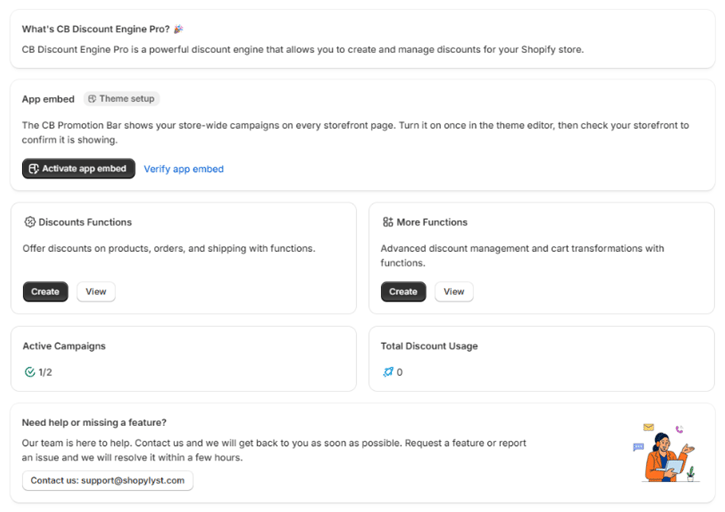
App embed
The App embed card turns on the CB Promotion Bar, which shows your store-wide campaigns on every storefront page. Click Activate app embed to open your theme editor with the embed selected, turn it on, and save the theme. Then check your storefront to confirm the bar is showing. The other app embeds and blocks are set up from the Storefront page.Discounts Functions
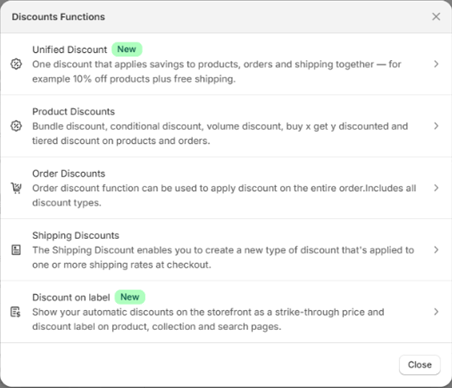
Offer discounts on products, orders and shipping.- Create opens a chooser with Unified Discount, Product Discounts, Order Discounts, Shipping Discounts and Discount on label. The first four open the campaign form; Discount on label opens the Discount prices page.
- View opens the campaign list.
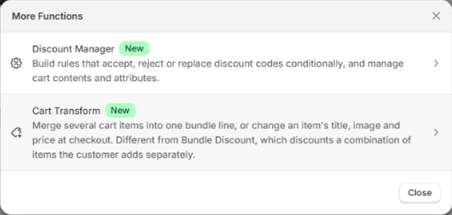
More Functions
Advanced discount management and cart changes.- Create opens a chooser with the Discount Manager and Cart Transform builders.
- View opens the matching tab on the Manage page, where you can see what each one has configured and which parts are active.
Active Campaigns
The number of campaigns that are currently Active, out of all the campaigns the app has created, for example3/5. Scheduled and expired campaigns count toward the total but not the active number.
Total Discount Usage
How many times the app’s discounts have been used on orders, added up across all campaigns.The two counts load a moment after the page. A spinner shows while they load, so you never see a number that is not yet correct.