Two separate settings decide how much discount a shopper ends up with:
  • Discount application strategy decides what happens inside one discount, when several of its campaigns could apply.
  • Combinations decide whether this discount can stack with other discounts on the store.
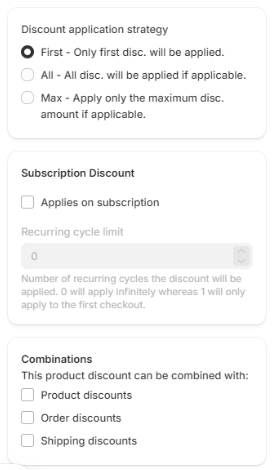
Discount application strategy and Combinations in the side panel

Discount application strategy

Set in the side panel of the campaign form.
With First, order matters. Use Move up and Move down in the campaign list to put the campaign you want to win at the top.

Combinations

Under Combinations, tick which other kinds of discount this one may combine with: product, order and shipping discounts. These are Shopify’s own combination settings, so they work the same way as for discounts you create in the Shopify admin.
Both discounts have to allow the combination. If this discount combines with order discounts but the other order discount does not combine with product discounts, Shopify applies only one of them.

Discount tags

Discount Tags let several product discounts apply to the same cart line. Shopify matches tags in both directions, so a tag only takes effect if the other discount names one of your tags in return.
Discount tags need Shopify Plus.

Seeing every discount on the store

Shopify decides which discounts stack, using each discount’s own combination settings; there is no priority order to set across discounts. To review or pause discounts from this app, other apps and Shopify itself in one place, use All discounts.